From Proxy to Gateway: Managing Multi-Tenant Webhooks on Localhost
IT
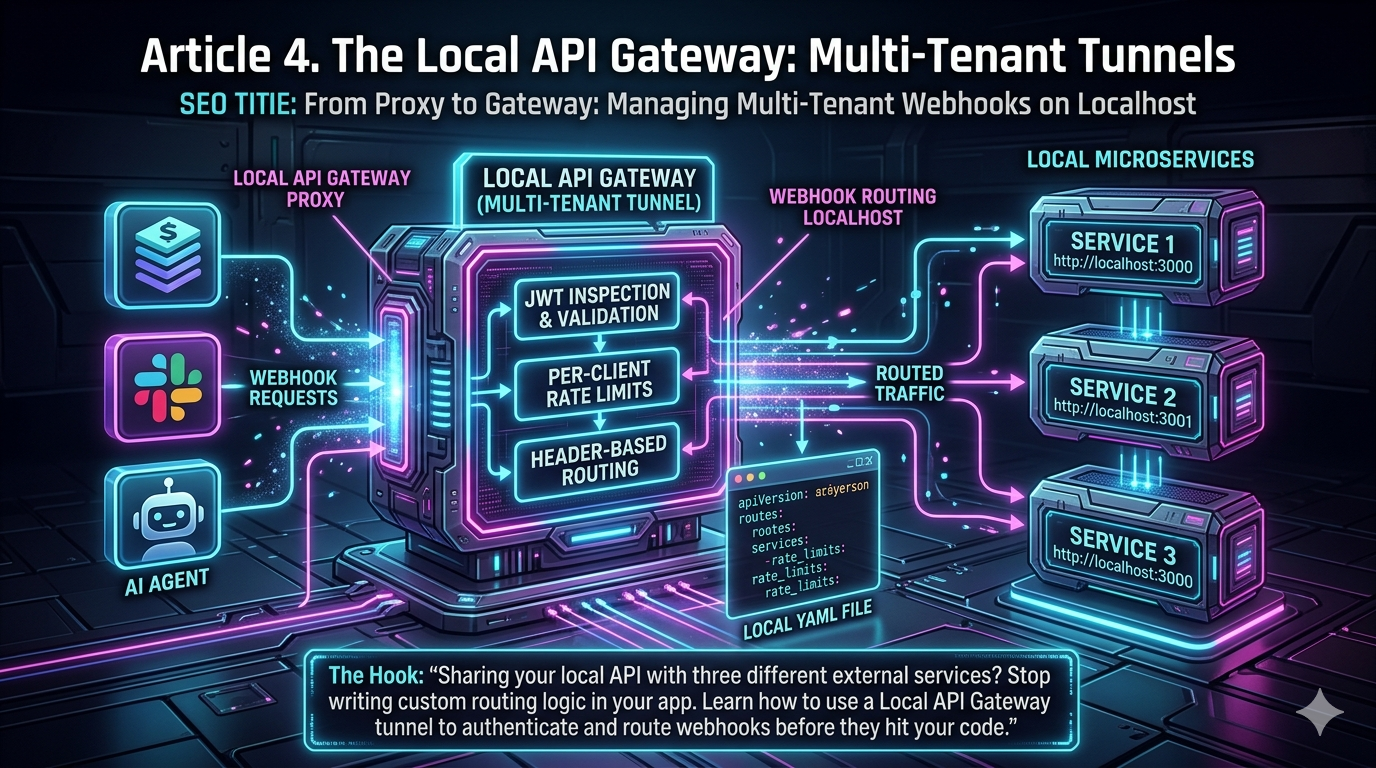
Sharing your local API with three different external services? Stop writing custom routing logic in your app. Learn how to use a Local API Gateway tunnel to authenticate and route webhooks before they hit your code.
In modern development, building software rarely means writing isolated code. Today’s applications orchestrate AI agents, process payments via Stripe, and push real-time notifications to Slack — all simultaneously. Every one of these external services needs to talk back to your local development environment via webhooks.
Historically, this created a significant bottleneck. Developers would open a single local tunnel, point all third-party services at one endpoint, and write messy routing and authentication logic directly into their application to sort incoming traffic.
That approach is dead. The simple reverse proxy has evolved. Enter the Local API Gateway — a sophisticated, multi-tenant tunnel that fundamentally changes how we handle webhook routing on localhost.
The Chaos of the Single-Port Tunnel
To understand the value of a Local API Gateway, you first need to sit with the pain of the legacy workflow.
When an external platform like Stripe, GitHub, or an AI model provider needs to notify your application of an event, it pushes an HTTP POST request to a URL you provide. Because your laptop sits behind a router without a public IP, you use a tunneling service to expose a local port to the internet.
Traditionally, you’d run a command exposing port 3000, and your Node.js application would suddenly be responsible for acting as traffic cop for the entire internet. The chaos begins immediately.
Polluted business logic. Your application code must inspect the incoming path — /stripe, /slack, /github — and route it to the correct internal module. This is infrastructure work dressed up as application code.
Authentication nightmares. Every provider uses a different authentication method. Stripe signs its payloads using HMAC-SHA256. Custom AI agents commonly use JSON Web Tokens (JWTs). Your app has to manage the secrets and verification logic for all of them, scattered across multiple files.
The raw body problem. In frameworks like Express, standard JSON parsing middleware (express.json()) parses the body and discards the raw bytes. This is the single most common reason signature verification fails — the payload is altered before the cryptographic hash can be computed. Developers end up writing convoluted express.raw() workarounds just to verify incoming webhooks.
Microservice friction. If you’re running a payment service on port 4000 and a notification service on port 5000, a single-port tunnel forces you to build a reverse proxy in code just to route traffic to the right local server.
By routing everything to a single port, your application takes on the responsibilities of a gateway, a load balancer, and a firewall — none of which it was designed to be.
The Concept: The Multi-Tenant Tunnel as a Local API Gateway
The modern solution is the Local API Gateway. Tunneling platforms — most notably ngrok, which has fully repositioned itself as an AI and API Gateway platform — now let you define complex, multi-tenant traffic routing directly at the tunnel edge, before traffic ever reaches your code.
Instead of implementing webhook validation and routing logic separately in every service, a webhook gateway provides a single, secure entry point for all third-party webhooks. The tunnel itself acts as a fully-fledged API Gateway running on your local machine, configured via a declarative YAML file.
The gateway handles the following before the request touches your code:
- Webhook routing: Inspects the HTTP request path and headers, and routes the payload to entirely different local ports or microservices.
- Cryptographic signature verification: Natively understands how to verify signatures from providers like Stripe, Slack, and GitHub. If the signature is invalid, the gateway drops the request — your application never sees it.
- JWT validation: Intercepts incoming requests carrying JSON Web Tokens, validates the issuer and audience against your configuration, and rejects unauthorized traffic at the edge.
This is a paradigm shift. Your application code returns to what it does best — processing business logic — while the gateway handles networking, authentication, and routing.
Deep Dive: Webhook Routing on Localhost
In a microservices architecture, you might have a payment service on port 8080 and a notification service on port 8081. With a Local API Gateway, you configure this with a declarative Traffic Policy file rather than running two separate tunnels with two separate public URLs.
The gateway inspects the incoming request URL path and routes accordingly:
- A request hitting
/stripeis forwarded to your payment service. - A request hitting
/slackis routed to your notification service.
Here’s what a simplified ngrok Traffic Policy configuration looks like for this pattern:
on_http_request:
  - expressions:
      - req.url.path.startsWith('/stripe')
    actions:
      - type: verify-webhook
        config:
          provider: stripe
          secret: "${STRIPE_WEBHOOK_SECRET}"
      - type: forward-internal
        config:
          url: https://payment-service.internal

  - expressions:
      - req.url.path.startsWith('/slack')
    actions:
      - type: verify-webhook
        config:
          provider: slack
          secret: "${SLACK_SIGNING_SECRET}"
      - type: forward-internal
        config:
          url: https://notification-service.internal
The beauty of this approach is that it mirrors production. In a live environment, you’d use an Ingress controller or a cloud provider’s API gateway for this routing. By using a Local API Gateway, your local development environment achieves architectural parity with production from day one.
Native Webhook Signature Verification
Perhaps the most significant workflow improvement is native webhook signature verification — and it directly solves the raw body problem that plagues Express developers.
When a provider like Stripe or GitHub sends a webhook, they sign it with a shared secret to prove the payload hasn’t been tampered with in transit. Verifying this signature requires strict cryptographic logic: you must recompute the HMAC signature, compare it in constant time to avoid timing attacks, and validate that the timestamp is recent (typically within a five-minute window) to block replay attacks.
If you mess up the byte parsing — for example, by failing to capture the raw body in Express — the signature check fails silently.
A modern Local API Gateway eliminates this entire class of errors. The ngrok webhook gateway, for instance, centrally validates webhook signatures and prevents tampering before routing authenticated requests to your internal services. As of 2025, ngrok provides built-in verification actions for over 70 supported providers, including Stripe, Twilio, Slack, GitHub, Shopify, and DocuSign.
You configure the gateway with your provider secret. If the signature is valid, the gateway strips the cryptographic headers and forwards a clean, verified JSON payload to your application. If verification fails, the request is automatically rejected. Your application logs stay clean — filled only with valid, authenticated business events.
The JWT Validation Proxy
As AI agents and custom client applications become more prevalent, managing inbound authentication is a growing challenge. Many modern APIs and agent frameworks rely on JSON Web Tokens for OAuth 2.0, OpenID Connect (OIDC), and API authentication flows.
Historically, developers imported JWT libraries into each of their services, fetched JSON Web Key Sets (JWKS), parsed tokens, verified signatures, and extracted claims. If you have three microservices, you’re replicating this overhead three times.
The multi-tenant tunnel solves this by acting as a JWT validation proxy at the network edge. Modern gateway tools let you specify multiple issuers; a request is validated if it presents a JWT signed by any one of them. The gateway pulls the token from a specified location (typically the Authorization header), strips the Bearer prefix, and validates the payload.
If a token is invalid, missing, or expired, the gateway immediately returns a 401 Unauthorized. Your local application never receives unauthenticated traffic.
Because the gateway caches JWKS lists for performance — typically refreshing roughly every 15 minutes — it dramatically speeds up local request handling compared to fetching keys manually inside your application on every request.
The benefits compound quickly:
- Enforced authentication at the network layer, not the application layer.
- Reduced backend load — unauthorized requests are rejected before they reach your services.
- Zero library overhead — no JWT libraries to manage, update, or audit per service.
The WAF Layer: OWASP CRS and Coraza
A recent and important addition to the modern gateway stack is the integration of a Web Application Firewall (WAF) directly into the traffic policy system. ngrok announced in December 2025 that it had integrated the OWASP Coraza WAF engine into its Traffic Policy system and ran it against every request to ngrok.com, blocking 1.2% of all traffic.
Coraza is an open-source, high-performance WAF engine written in Go that executes OWASP Core Rule Set (CRS) rules. The CRS protects against the OWASP Top 10 attack categories including SQL injection, cross-site scripting (XSS), PHP and Java code injection, and shellshock — with continuous community updates as real-world attack patterns evolve.
The ngrok implementation added two Traffic Policy actions — owasp-crs-request and owasp-crs-response — that map directly to CRS’s request and response phases. This lets you enable enterprise-grade attack detection with a few lines of YAML:
on_http_request:
  - actions:
      - type: owasp-crs-request
        config:
          mode: block
The WAF supports a dry-run detection mode first, so you can identify false positives before enabling blocking — matching how WAF deployments work in production. All block decisions are observable through action result variables, giving you full visibility into why a request was denied.
This means your local development environment can run the exact same WAF ruleset as your production cluster, eliminating an entire class of security regressions that only appear after deployment.
Agentic AI and the MCP Gateway
The gateway model has taken on new urgency in 2026 with the rise of autonomous AI agents. As ngrok’s own engineering team put it in April 2026: “In 2025, AI gateways managed LLM traffic. In 2026, they manage autonomous agents.”
The shift is architectural. A single user request to an AI agent can now trigger 20–50 LLM calls, tool invocations, and multi-step reasoning chains. Agents talk to Slack, Notion, databases, and internal APIs through Model Context Protocol (MCP) servers — and each of those connections needs to be authenticated, audited, and rate-limited.
ngrok now officially supports using its gateway as an MCP gateway, allowing you to:
- Expose a local MCP server to cloud-based AI agents via a persistent, named internal endpoint.
- Enforce IP allowlisting (for example, restricting traffic to Anthropic’s source IPs only).
- Audit and transform all tool calls before they reach your MCP server process.
A basic ngrok configuration for an MCP server looks like this:
version: 3
agent:
  authtoken: <your_ngrok_authtoken>
endpoints:
  - name: mcp-server
    url: https://mcp.example.internal
    upstream:
      url: http://localhost:8787
This is the same connectivity problem that generic HTTP tunnels fail to solve — agentic workflows demand persistent subdomains, concurrent streaming over Server-Sent Events (SSE), and endpoints that survive local machine restarts. Purpose-built gateway infrastructure handles all of this natively.
Traffic Shaping, Observability, and Replays
A multi-tenant tunnel is not just about routing and authentication — it provides a robust developer experience for debugging the inherently asynchronous world of webhooks.
The Traffic Inspector
Modern Local API Gateways ship with a real-time traffic inspector UI. When developing locally, you can use it to validate webhook payloads, inspect request headers, and troubleshoot integration issues without adding console.log statements everywhere.
Critically: if your application crashes or you find a bug in your parsing logic after the fact, you don’t need to go back to the Stripe or GitHub dashboard to trigger a new event. You can replay webhook requests directly from the inspector — including modifying the headers or body before replaying.
Additional Traffic Controls
- Rate limiting: Webhook providers can send massive bursts of events. The gateway can throttle incoming traffic to protect your local application from being overwhelmed.
- Header manipulation: The gateway can inject custom headers before forwarding to your app, passing along metadata verified during the edge authentication phase (such as a validated JWT claim).
- CEL expressions for dynamic routing: ngrok’s Traffic Policy uses Common Expression Language (CEL) for routing conditions, enabling dynamic header-based routing like
https://${req.headers('X-Custom-Header')}.internal. - Geo-aware routing and compliance: The same gateway infrastructure supports region-aware routing for compliance scenarios, ensuring traffic flows through specific geographic Points of Presence — a feature that carries directly from local development into production.
Constructing the Modern Workflow
Here’s what the end-to-end developer workflow looks like today.
1. Start your local services. Boot a billing service on Node.js at port 3000 and a user-management service on Go at port 4000.
2. Define the Traffic Policy. Write a YAML file telling the gateway how to behave:
on_http_request:
  - expressions:
      - req.url.path.startsWith('/api/billing')
    actions:
      - type: verify-webhook
        config:
          provider: stripe
          secret: "${STRIPE_SECRET}"
      - type: forward-internal
        config:
          url: https://billing.internal

  - expressions:
      - req.url.path.startsWith('/api/users')
    actions:
      - type: jwt-validation
        config:
          issuer:
            allow_list:
              - value: "https://your-auth0-tenant.auth0.com/"
          audience:
            allow_list:
              - value: "https://your-api.example.com"
      - type: forward-internal
        config:
          url: https://users.internal
3. Launch the gateway. Pass the YAML config to the ngrok agent. It starts and binds a single public tunnel URL.
4. Paste the URL into your providers. Configure Stripe, Slack, GitHub, and any other webhooks to POST to your public tunnel.
5. Develop in peace. The gateway intercepts all traffic, validates the cryptography, sorts the paths, and delivers authenticated, clean payloads to the correct microservice. If a request fails validation, the gateway returns the appropriate 4xx response automatically and logs the failure in the Traffic Inspector.
Your application logs are clean. They contain only valid, verified business events.
The Competitive Landscape
ngrok is not the only player here, though it remains the reference implementation for the Local API Gateway pattern. As of 2026:
- Kong AI Gateway (v3.14, April 2026) extended its gateway to support MCP and agent-to-agent (A2A) protocol traffic, positioning itself as a unified control plane for all AI traffic types. Gartner’s Emerging Tech Adoption Radar 2026 cited AI Gateways as helping organizations gain visibility and control over agentic workloads.
- Traefik launched an MCP Gateway with task-based access control, targeting Kubernetes-native deployments.
- Cloudflare AI Gateway provides edge-level observability with logs at massive scale (100M+ entries), without the local agent model.
- InstaTunnel has emerged as a free-tier alternative with a more generous bandwidth allocation for solo developers, though it lacks the enterprise-grade observability of ngrok.
The common thread across all of them: the simple reverse proxy is inadequate for 2026’s development workflows, and the industry has converged on the gateway model as the answer.
Conclusion: Embrace the Gateway
The era of the simple reverse proxy is behind us. As the complexity of integrations grows — webhook providers, AI agents, MCP servers, OAuth flows — relying on a basic tunnel to dump raw, unauthenticated traffic directly into your application is a recipe for technical debt and security vulnerabilities.
The Local API Gateway gives your local development environment the same rigor as a production cluster:
- No more custom routing logic in application code.
- No more battling Express body parsers for HMAC verification.
- No more JWT libraries duplicated across every microservice.
- No more manual debugging sessions triggered by webhook events you can’t reproduce.
Whether you’re managing high-volume webhook traffic, authenticating AI agents over MCP, or routing traffic across local microservices, the Local API Gateway is the tool that finally brings production-grade infrastructure to localhost.
Sources: ngrok Webhook Gateway documentation · ngrok AI Gateway 2026 · ngrok WAF with OWASP CRS and Coraza · ngrok MCP Gateway documentation · Kong Agent Gateway announcement
Related InstaTunnel pages
Continue from this article into the most relevant product guides and workflows.


Comments
Post a Comment