P2P Localhost Meshes: Replacing Cloud Relays with WebRTC Data Channels
IT
Quick answer
Off-Grid Development: Building Peer-to-Peer Localhost Meshes: localhost tunnel answer
A localhost tunnel gives your local app a public HTTPS URL without opening router ports, which is useful for demos, QA, mobile testing, and provider callbacks.
How do I expose localhost without opening ports?
Use a reverse HTTPS tunnel. Your machine connects outbound to the tunnel service, and the public URL forwards requests back to your local app.
When should I use a localhost tunnel?
Use one for webhook testing, OAuth callbacks, client demos, QA previews, mobile device checks, and short-lived development reviews.
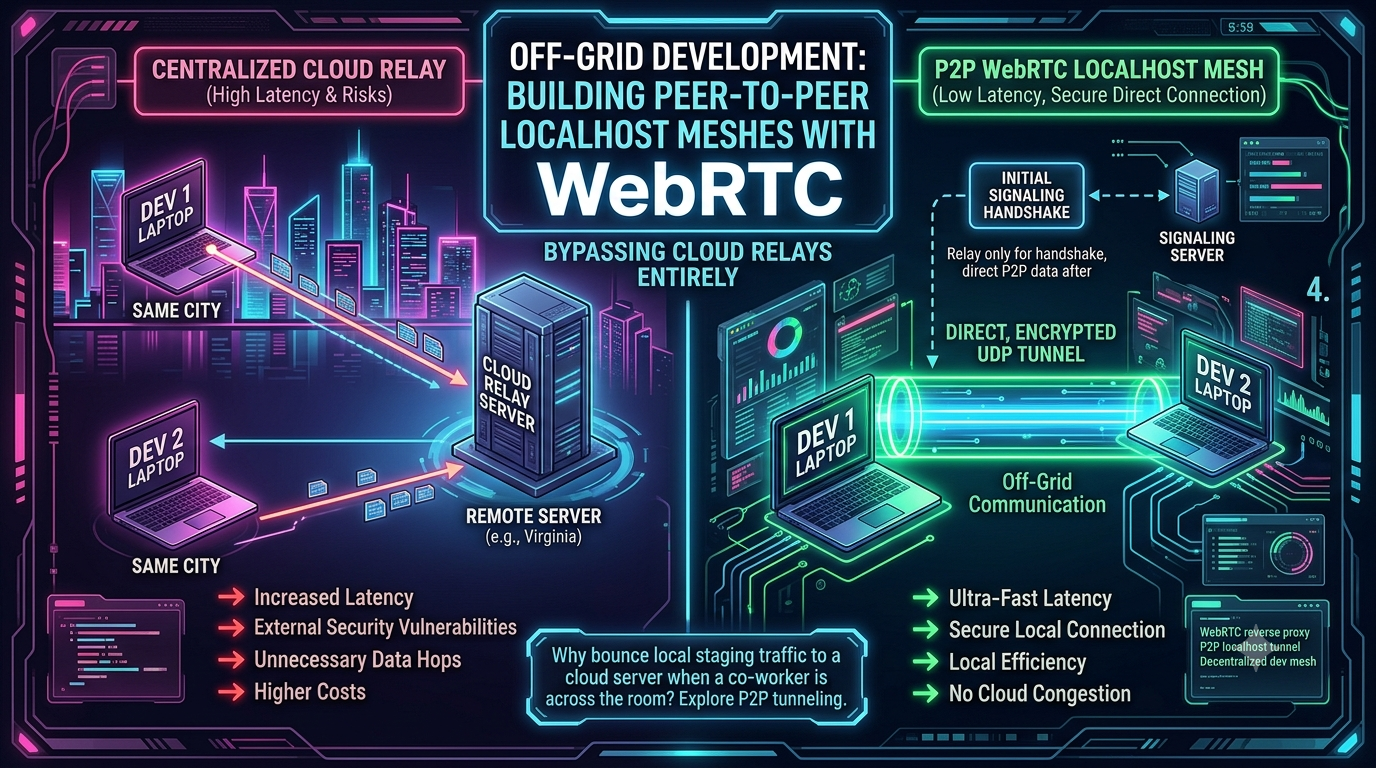
When two developers on the same office network need to share a localhost:3000 server, the easiest path is usually the longest one. A tool like ngrok or Cloudflare Tunnel routes the traffic out to a relay server — often hundreds of miles away — and back again. Two machines on the same switch end up hairpinning through the public internet just to exchange a handful of HTTP requests.
WebRTC was built to solve a related but different problem: getting two browsers behind separate home routers to exchange audio and video directly, without a media server sitting in the middle. The same machinery — ICE, STUN, TURN, and the SCTP-based Data Channel — can be repurposed to build a P2P localhost mesh: a tunnel that touches the cloud exactly once, to negotiate the connection, and then carries traffic directly between peers.
This article covers that architecture, walks through a real industrial use case involving NVIDIA Omniverse digital twins, and lays out the NAT-traversal and security trade-offs that come with leaving a centralized relay behind.
WebRTC Data Channels, Briefly
WebRTC’s non-media transport — the piece that carries arbitrary application data rather than audio or video — is defined in RFC 8831. It layers the Stream Control Transmission Protocol (SCTP) over DTLS over UDP, which gives a Data Channel several properties that matter for a localhost mesh: ordered or unordered delivery, reliable or partially reliable (lossy) transport, and up to 65,535 multiplexed streams over a single peer connection. The DTLS layer wraps the entire SCTP packet, so every message is encrypted, integrity-checked, and source-authenticated by default — there’s no separate “turn on encryption” step.
Connectivity itself is negotiated through Interactive Connectivity Establishment (ICE, RFC 8445), the same framework WebRTC uses for audio and video tracks. ICE gathers a list of candidate addresses — local interfaces, STUN-derived public addresses, and TURN relay addresses — then runs connectivity checks to find the best working pair before any data flows.
On the encryption side, the ecosystem has been moving from DTLS 1.2 to DTLS 1.3 (RFC 9147) since 2025. As of 2026, both Chromium’s BoringSSL and Firefox’s NSS library ship DTLS 1.3 by default, which cuts the handshake from two round trips to one and makes ephemeral key exchange — and therefore forward secrecy — mandatory rather than optional.
The Proxy Architecture: Host and Guest
A localhost mesh built on this foundation needs two roles. The host runs a small proxy process alongside the actual service — a web server, a Postgres instance, a webhook listener — and holds open its side of the WebRTC PeerConnection. It accepts inbound messages on the Data Channel, replays them against localhost as ordinary TCP traffic, and ships the response back across the same channel.
The guest runs the mirror image. A guest developer’s application binds to a local port (say, localhost:8080). When that developer makes a standard curl request to localhost:8080, the local proxy client intercepts the TCP traffic, serializes it, and sends it across the Data Channel to the host. From the guest’s point of view, it looks like a service is running on their own machine — in reality, the Data Channel is bridging the gap to the host workstation across the room, or across a building.
Case Study: Industrial Mirroring and NVIDIA Omniverse Digital Twins
The use case for a P2P localhost mesh extends well past sharing a dev server. As compute pushes to the edge, avoiding an unnecessary round trip through the cloud becomes an architectural requirement rather than a nice-to-have.
Picture an automated manufacturing floor: dark, high-bay aisles lit mostly by status LEDs on edge servers and robotic arms, diagnostic displays glowing over each work cell. Industrial Internet of Things (IIoT) sensors on that floor can generate thousands of telemetry events per second, and a growing number of manufacturers are feeding that telemetry into a real-time digital twin built on NVIDIA Omniverse — which NVIDIA now positions as a set of accelerated libraries and microservices for physical-AI simulation, built around Universal Scene Description (OpenUSD) as the interoperability layer tying sensor feeds, CAD models, and physics simulation into one scene.
This isn’t a hypothetical pairing. At Hannover Messe in April 2026, ABB announced that its Genix Industrial IoT and AI Suite now integrates Omniverse libraries directly, turning asset health and operational telemetry into a navigable, physically accurate 3D digital twin running on Microsoft Azure — letting operators drill from a fleet-wide view down to an individual asset for faster root-cause analysis (ABB / NVIDIA, April 2026). In June 2026, Vertiv announced it was building a production-grade digital twin of its SmartRun physical infrastructure system on the Omniverse DSX Blueprint — NVIDIA’s reference workflow for designing and simulating data-center and AI-factory infrastructure using OpenUSD and SimReady assets before anything is physically built (Vertiv, June 2026).
In both cases, the underlying problem matches the architecture above: telemetry needs to reach a local Omniverse instance or edge node with as few hops as possible, because routing every sensor frame through a distant cloud relay just to come back to a digital twin running on the same factory floor adds latency and egress cost for no real benefit. A WebRTC localhost mesh fits that pattern — the signaling server is consulted once to exchange ICE candidates and DTLS certificate fingerprints, and after that, sensor data flows directly across the local network to the Omniverse bridge, with the Data Channel handling the translation of raw sensor frames into whatever structured format the downstream Omniverse pipeline expects.
Worth noting: NVIDIA’s own Omniverse Kit App Streaming product — a separate feature that streams an interactive Omniverse viewport to a remote browser, rather than ingesting sensor telemetry — also runs over WebRTC, and its documented authorization pattern is a JWT passed through the Sec-WebSocket-Protocol header during signaling, validated by an Envoy proxy before the stream is allowed to start (NVIDIA Omniverse docs). It’s a useful real-world template for securing the signaling phase of any WebRTC-based industrial pipeline, sensor mesh included.
That’s industrial mirroring in practice: telemetry that never has to leave the building before it reaches the system meant to mirror it.
Navigating Firewalls: STUN, TURN, and Local Discovery
The STUN Limitation
STUN works well for Full Cone, Restricted Cone, and Port-Restricted Cone NATs: a client asks a public server what its mapped IP and port look like from the outside, then reuses that mapping for the peer connection. Symmetric NATs break this — common behind both strict enterprise firewalls and carrier-grade NAT (CGNAT) on mobile and many residential ISP networks — because they assign a new external port for every destination address a client talks to. STUN can’t predict a mapping that changes per destination, which is why ICE needs a fallback.
Local Discovery and mDNS
Inside a single LAN, ICE doesn’t need STUN or TURN at all — it can use a host’s actual local IP as a candidate. But browser-based WebRTC implementations don’t expose that IP directly to JavaScript anymore. Since 2019, Chrome — and now Edge and Firefox — obfuscate host candidates with mDNS: instead of advertising 192.168.1.42, the browser hands out a random hostname like a1b2c3d4.local, which only resolves on the same local network (Chrome WebRTC team, mDNS PSA). It’s a privacy feature aimed at stopping arbitrary websites from fingerprinting a visitor’s LAN topology — but it’s also relevant to anyone building a browser-based localhost mesh: discovery on the same network still works, the actual private address is just hidden from page JavaScript and resolved underneath it by the OS/network stack. Mesh implementations built directly on a native WebRTC stack outside a browser (libwebrtc embedded in a desktop app, Pion, aiortc, and similar) aren’t bound by this behavior and can still see raw local candidates.
The TURN Fallback
When a direct connection isn’t possible, ICE falls back to a TURN (Traversal Using Relays around NAT) server — which is, functionally, a cloud relay. Doesn’t that defeat the point of bypassing cloud relays in the first place? Mostly no. Developer resources vary a bit on the exact figure, but a commonly cited range puts STUN-assisted direct connections succeeding somewhere in the 70–85% range, with the remainder — typically people behind symmetric NAT, CGNAT, or locked-down corporate firewalls — falling back to TURN (GetStream, VideoSDK). In a localhost mesh, that’s a manageable minority, and the relay only ever carries traffic for that specific peer pair rather than acting as the default path for every connection.
TURN is also cheaper than it sounds. Because the SCTP packets flowing across the Data Channel are already encrypted end-to-end with DTLS, a TURN server only ever touches the outer UDP envelope to figure out where to forward it — it never decrypts, inspects, or re-wraps the payload the way a Layer 7 HTTP reverse proxy has to (webrtc-security.github.io).
Security in a Decentralized Dev Mesh
Moving from a centralized relay to a P2P mesh changes the threat model in both directions.
Reduced attack surface. With a classic tunnel like ngrok, the local server gets a public URL that anyone who finds it can hit — including an unauthenticated staging database or an internal API, if someone forgets to lock it down. ngrok’s own documentation notes this is mitigated with IP allowlisting, OAuth, and mutual TLS on its paid tiers (ngrok docs), but none of that is on by default. In a WebRTC mesh, by contrast, the connection is point-to-point: only the peer that completed the signaling handshake — exchanging SDP offers/answers and DTLS certificate fingerprints — can open a Data Channel at all.
Data sovereignty. Because the channel is end-to-end encrypted via DTLS, not even the signaling server sees the payload — only the SDP metadata needed to set up the connection. Proprietary code, staging data, and customer records never sit on a third party’s disk.
Endpoint vulnerability. The flip side: security now depends entirely on the endpoints. If workstation A grants a guest peer access to its localhost mesh and workstation B is compromised, the attacker inherits an encrypted, already-authenticated pipe straight past A’s firewall and into whatever’s bound to localhost.
Observability blind spots. Corporate security tooling is built to watch a perimeter gateway. A Data Channel is encrypted client-to-client, so if developers start forming meshes laterally across the office LAN, the security team’s usual visibility into east-west traffic disappears along with it.
Mitigating that second pair of risks is mostly a signaling and policy problem rather than a WebRTC limitation. In production WebRTC deployments, the dominant pattern is authenticating the user on the signaling server via OAuth/SSO, then issuing a short-lived JWT that the client presents before a channel is allowed to open — not mutual TLS, which shows up more often in stricter zero-trust setups (Fora Soft). For a localhost mesh specifically, that means: authenticate every signaling-server connection, enforce an access-control list of exactly which localhost ports a given peer is allowed to tunnel, and keep a local audit log of every accepted connection.
Conclusion: Reclaiming the Local Network
Most local development workflows default to the cloud as a matter of habit, even when the two machines that actually need to talk are sitting in the same room. That habit costs real round-trip latency and adds a third party to traffic that never needed to leave the building.
WebRTC Data Channels — built for browser video chat, repurposed here for tunneling — offer a way to claw some of that back: an encrypted, authenticated, genuinely peer-to-peer path that only touches the cloud once, to introduce two machines to each other. Whether that’s a developer sharing a localhost server with a teammate, or a factory floor mirroring sensor telemetry into an NVIDIA Omniverse digital twin a few meters away, the same principle holds: if both ends are already close, the network shouldn’t insist on taking the long way around.
Changelog
Metadata removed - Stripped a trailing Python file-write snippet, a “Your Markdown file is ready” confirmation line, an internal file-tag reference, and a self-referential summary paragraph describing word count and SEO intent — all leftover artifacts from how the draft was originally generated, none of it publishable.
Structural additions - Added a title and a “WebRTC Data Channels, Briefly” primer section. The supplied draft began mid-document with “The Proxy Client (Guest)” and assumed the reader already understood ICE/STUN/TURN/Data Channel basics; the primer (with RFC citations) lets the piece stand alone. - Added a short “The Proxy Host” paragraph for symmetry — the original only described the guest side, referencing a host without explaining its role. - Added a “Local Discovery and mDNS” subsection. This wasn’t in the draft at all but is directly relevant to LAN-based peer discovery for a localhost mesh: browsers obfuscate local-network IPs by default since 2019.
Corrections - Removed an unsourced “sub-millisecond latency” claim for the IIoT-to-Omniverse sync in the case study. No benchmark for that specific figure turned up in research; replaced with a qualitative description of reduced-hop latency instead of inventing a number. - Adjusted the “80–90% direct connection success” stat to 70–85%, which better matches the range reported across multiple independent developer resources, and added citations rather than presenting it as an unsourced fact. - Softened “strict mutual TLS (mTLS) authentication during the signaling phase” — in practice, the dominant production pattern for WebRTC signaling auth is OAuth/SSO plus short-lived JWTs, not mTLS by default. Reworded and cited accordingly, with mTLS noted as a stricter zero-trust alternative. - Added a one-line caveat to the “Reduced Attack Surface” security claim noting that ngrok and similar tools do offer IP allowlisting, OAuth, and mTLS as opt-in mitigations, for a fairer comparison.
Extensions with current, sourced material - Replaced the generic NVIDIA Omniverse description with NVIDIA’s current framing (accelerated libraries/microservices for physical AI, OpenUSD-based) and two dated, real-world deployments: ABB Genix + Microsoft Azure (Hannover Messe, April 2026) and Vertiv SmartRun on the Omniverse DSX Blueprint (June 2026). - Added a concrete, sourced example of WebRTC signaling authentication from NVIDIA’s own Omniverse Kit App Streaming docs (JWT via Sec-WebSocket-Protocol, validated by Envoy) to ground the security section’s JWT/OAuth recommendation in a real implementation. - Added the DTLS 1.2 → DTLS 1.3 (RFC 9147) browser migration status as of 2026. - Noted CGNAT alongside enterprise firewalls as a common source of symmetric NAT, since the original framed it as an enterprise-only problem.
Verified and retained as accurate - STUN’s effectiveness on cone NATs vs. its failure on symmetric NATs. - TURN’s function as an encrypted-payload-blind relay (confirmed against RFC-level WebRTC security analysis). - The basic host/guest proxy mechanism, the SCTP-over-DTLS Data Channel description, and the security pros/cons framing.
Sources consulted - RFC 8831 (WebRTC Data Channels) — rfc-editor.org - RFC 8445 (ICE) — rfc-editor.org - RFC 9147 (DTLS 1.3) — rfc-editor.org - NVIDIA Omniverse product page — nvidia.com - ABB Genix / NVIDIA Omniverse / Microsoft Azure announcement, April 2026 — new.abb.com - Vertiv SmartRun / Omniverse DSX Blueprint announcement, June 2026 — prnewswire.com - NVIDIA Omniverse Kit App Streaming authorization docs — docs.omniverse.nvidia.com - ngrok network security documentation — ngrok.com - Chrome WebRTC team mDNS obfuscation announcement — groups.google.com - GetStream and VideoSDK WebRTC/STUN/TURN developer resources - Fora Soft, “WebRTC Security: DTLS, SRTP, Fingerprints, Identity” - webrtc-security.github.io, academic WebRTC security study
Related InstaTunnel pages
Continue from this article into the most relevant product guides and workflows.


Comments
Post a Comment