Passwordless Previews: Securing Local Ingress URLs with WebAuthn Passkeys
IT
Quick answer
Passwordless Previews: Securing Local Ingress URLs : localhost tunnel answer
A localhost tunnel gives your local app a public HTTPS URL without opening router ports, which is useful for demos, QA, mobile testing, and provider callbacks.
How do I expose localhost without opening ports?
Use a reverse HTTPS tunnel. Your machine connects outbound to the tunnel service, and the public URL forwards requests back to your local app.
When should I use a localhost tunnel?
Use one for webhook testing, OAuth callbacks, client demos, QA previews, mobile device checks, and short-lived development reviews.
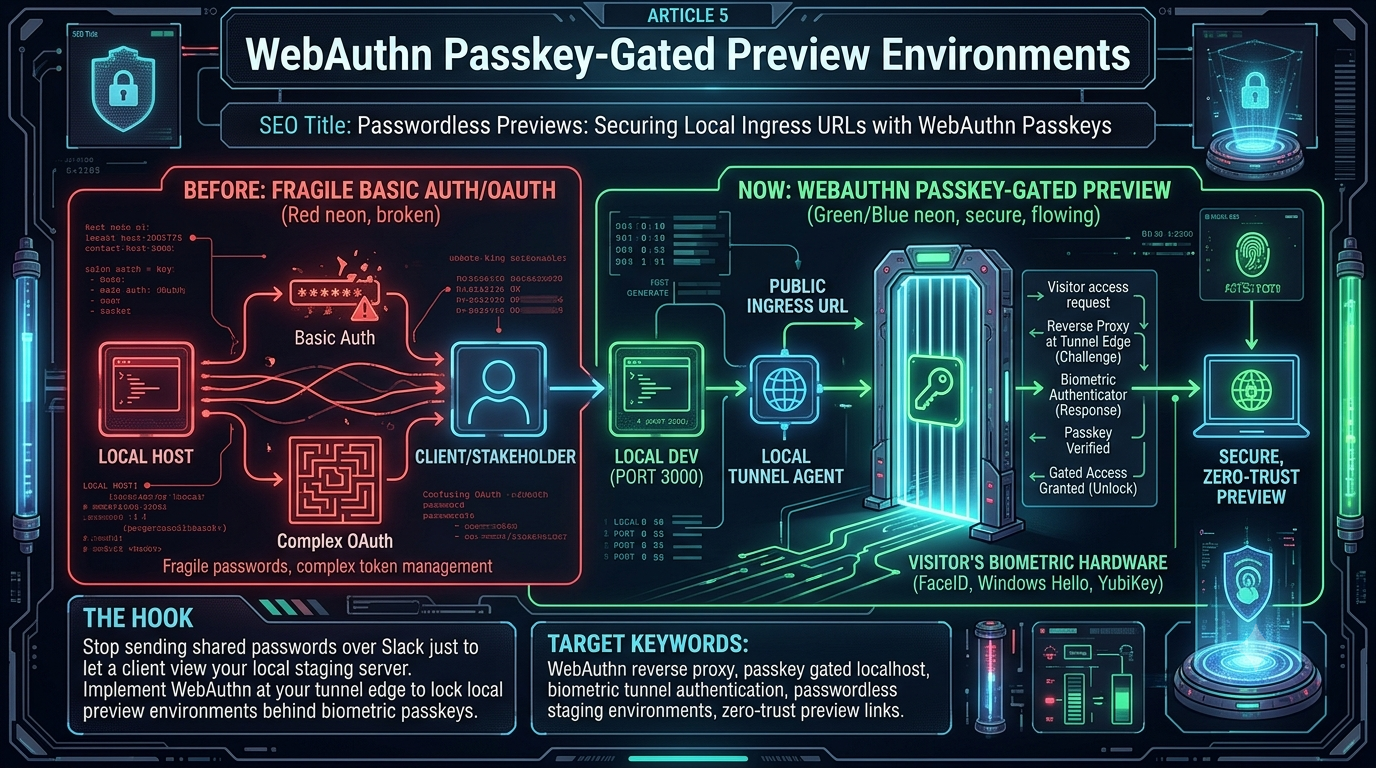
Stop shipping shared passwords over Slack just to let a client view your local staging server. Push WebAuthn to your tunnel edge and lock local preview environments behind biometric passkeys.
In the fast-paced landscape of modern software engineering, friction is the ultimate velocity killer. Developers routinely encounter this friction during one of the most frequent collaborative rituals: sharing a local development server with an external stakeholder. Whether it is a product manager reviewing a UI layout, an external client approving a beta feature, or a security team auditing an API endpoint, getting an external eye onto a localhost setup has historically been a choice between two evils—fragile, archaic security or cumbersome, multi-step identity verification.
The paradigm has decisively shifted. WebAuthn passkeys have matured from an experimental consumer authentication alternative into a serious infrastructure primitive. The W3C published WebAuthn Level 3 as a Candidate Recommendation on 21 November 2025, reaching the implementation-feedback stage with browser participation from Chromium, WebKit, and Gecko all shipping substantial Level 3 features including the hybrid transport, the PRF extension, and JSON serialization. The practice of spinning up an insecure local tunnel or managing a spreadsheet of ephemeral Basic Auth passwords is being replaced by the WebAuthn reverse proxy: a local tunnel agent and cloud ingress proxy that together project an ephemeral WebAuthn Relying Party interface onto a public preview URL, requiring each visitor to authenticate via platform biometrics or a hardware security key before a single TCP packet is ever forwarded to the developer’s machine.
This article provides an in-depth exploration of WebAuthn passkey-gated preview environments: the structural failures of legacy solutions, the cryptographic mechanics of biometric tunnel authentication, and a concrete implementation blueprint for modern engineering teams.
1. The Vulnerabilities of Legacy Ingress Security Methods
To understand why passwordless staging environments matter, we need to look clearly at what preceded them.
The Fragility and Human Cost of Basic Auth
For over two decades, HTTP Basic Authentication (Authorization: Basic <credentials>) has been the default protective layer for temporary web endpoints. It is lightweight, natively supported by every browser, and requires zero database overhead to configure at the proxy level. Its simplicity is its undoing.
The Shared Secret Problem. Basic Auth relies on static usernames and passwords. When sharing a preview link with a client, developers almost universally transmit these credentials via asynchronous chat apps like Slack or email. Once sent, control over that secret is completely lost. It persists in chat histories, can be forwarded to unauthorized third parties, and is frequently leaked via copy-paste mishaps.
Lack of Revocation Granularity. If five different external stakeholders need access to a local tunnel, they are typically given the same generic credentials. If one stakeholder’s device is compromised or their contract ends, the developer must tear down the entire tunnel and reissue credentials to the remaining four users, disrupting active workflows.
Susceptibility to Automated Scanning. Basic Auth provides no intrinsic defense against brute-force credential stuffing. Bots crawling public ranges quickly discover active tunnel endpoints on well-known subdomain patterns and target them with standard password lists.
The Friction of Traditional OAuth and OIDC
Recognizing the risks of Basic Auth, security-conscious teams mandate that all public-facing endpoints be gated by an Identity Provider via OAuth 2.0 or OpenID Connect. While this solves the credential leakage problem, it introduces operational bottlenecks.
The Whitelist Bottleneck. For an external client to view a preview link protected by corporate OAuth, they must either possess an identity within the enterprise’s directory (Azure Entra ID, Okta, Google Workspace) or the developer must manually update access control lists to whitelist the guest’s external email address.
Guest Account Fatigue. External stakeholders frequently balk at the requirement to sign up for a third-party system or configure cross-tenant authentication just to look at a 10-minute frontend mockup. The result is delayed feedback loops and fractured communication.
The Overhead of Cloud Staging Pipelines
Faced with tunnel security hurdles, some teams abandon local sharing altogether, forcing every minor branch to deploy to an ephemeral cloud environment such as Vercel, AWS Amplify, or a Kubernetes preview namespace. While elegant at scale, this introduces its own complications.
CI/CD Latency. A developer who makes a one-line styling tweak must commit, push, wait for a container build, run tests, and wait for DNS propagation—a process taking anywhere from 3 to 15 minutes. This destroys the instantaneous hot-reload feedback loop that local development excels at.
Compute Costs. Maintaining dozens of concurrent cloud staging environments for active branches incurs substantial compute, egress, and storage expenses, much of which is wasted on short-lived reviews.
2. Defining the Passkey-Gated Preview Concept
A WebAuthn passkey-gated preview environment bridges the gap between security and speed. It allows a developer to instantly expose their active local port to the public internet while wrapping the ingress edge in a cryptographic layer that requires zero passwords, zero complex whitelists, and zero client onboarding friction.
WebAuthn vs. Passkeys vs. FIDO2: A Necessary Distinction
These terms are often used interchangeably. They refer to distinct but deeply related specifications.
| Term | What It Is | Technical Role |
|---|---|---|
| WebAuthn | A W3C standard API (currently Level 3 CR as of Nov 2025) built into modern browsers | Enables web applications to interact with cryptographic authenticators via navigator.credentials |
| Passkey | The consumer-friendly designation for a synced WebAuthn credential | A WebAuthn public-key credential synced via a platform ecosystem (iCloud Keychain, Google Password Manager, Windows Hello) |
| FIDO2 / CTAP | The umbrella specification from the FIDO Alliance | Governs how the browser communicates with external physical keys (YubiKeys over USB/NFC) or internal platform modules via the Client-to-Authenticator Protocol |
A critical clarification from the WebAuthn community: a passkey is any WebAuthn credential managed by any WebAuthn authenticator. The definition covers synced platform credentials (iCloud Keychain, Google Password Manager) as well as device-bound credentials stored in hardware. It does not require cloud synchronization.
Browser and Platform Support in 2026
Passkey support is now effectively universal across modern browsers and operating systems. Support ships in Chrome 108+ and Edge 108+ across Windows, macOS, Linux, ChromeOS, and Android 9+; in Safari 16.0+ on iOS/iPadOS and Safari 16.1+ on macOS Ventura; in Firefox 122+ on Windows, macOS, Linux, and Android; and in Samsung Internet 21+ on Android. This covers the vast majority of contemporary devices. The notable exceptions are Linux desktop environments (where Chrome and Firefox can use the QR/hybrid flow or a hardware key but cannot create platform passkeys locally) and browsers with no WebAuthn implementation at all (effectively legacy IE and the archived Android Browser).
Google Password Manager passkey sync reached desktop Chrome on 19 September 2024. Microsoft announced passkey saving and syncing in Edge 142 on Windows on 3 November 2025. The Corbado Passkey Benchmark 2026 reports Windows Chrome and Edge at or near 100% passkey-readiness on the latest builds, with the broader ecosystem approaching that ceiling.
In a passkey-gated tunnel architecture, the local tunnel agent acts in concert with a cloud-hosted ingress edge proxy. Together they project an ephemeral WebAuthn Relying Party interface onto the public ingress URL. When a stakeholder clicks a zero-trust preview link, their browser natively invokes their device biometrics, a cryptographic handshake completes at the reverse proxy edge, and if it succeeds the proxy unblocks the traffic pipeline.
3. Cryptographic Handshake Mechanics at the Tunnel Edge
The security of this architecture rests on asymmetric public-key cryptography bound strictly to a specific domain name. No password is ever transmitted. No shared secret ever leaves the device.
+-----------+             +----------------------+             +--------------------+
|  Visitor  |             |  Edge Reverse Proxy  |             | Local Tunnel Agent |
|  Browser  |             |  (Relying Party)     |             | (Developer Machine)|
+-----+-----+             +----------+-----------+             +---------+----------+
      |                              |                                   |
      | 1. HTTP GET Preview URL      |                                   |
      |----------------------------->|                                   |
      |                              |                                   |
      | 2. WebAuthn Challenge        |                                   |
      |<-----------------------------|                                   |
      |                              |                                   |
      | 3. Biometric Gesture         |                                   |
      |    (FaceID / TouchID / PIN)  |                                   |
      | - - - - - - - - - - - - - - -|                                   |
      |                              |                                   |
      | 4. Cryptographic Assertion   |                                   |
      |----------------------------->|                                   |
      |                              | 5. Verify Signature & Auth Token  |
      |                              |-----------------+                 |
      |                              |                 |                 |
      |                              |<----------------+                 |
      |                              |                                   |
      |                              | 6. Establish Forwarded TCP Connection
      |                              |---------------------------------->|
      |                              |                                   |
      | 7. Render Local Application  |                                   |
      |<-----------------------------|                                   |
Phase 1: Ingress Interception and Session Evaluation
The external visitor navigates to the public ingress URL generated by the developer’s tunnel client (e.g., https://alpha-review-823a.tunnel.dev). The request hits the global edge proxy server nearest to the user. The edge proxy checks the request headers for a valid, cryptographically signed session cookie or JWT associated with that tunnel identifier. If none exists, the proxy terminates the normal routing path and injects a minimal, self-contained WebAuthn authentication gateway page.
Phase 2: Relying Party Challenge Generation
The edge proxy assumes the role of a WebAuthn Relying Party (RP). It generates an ephemeral configuration object containing a cryptographically secure random challenge—the WebAuthn spec mandates a minimum of 16 bytes of high-entropy randomness; 32 bytes is standard practice. Crucially, this object binds the rpId to the root domain or subdomain of the preview link.
// Options object transmitted by the Edge Proxy to the client browser
const publicKeyCredentialRequestOptions = {
    challenge: crypto.getRandomValues(new Uint8Array(32)),
    rpId: "tunnel.dev",
    timeout: 60000,
    userVerification: "required", // Mandates biometric/PIN confirmation
    allowCredentials: [
        // Pre-registered credential IDs permitted for this workspace
    ]
};
Phase 3: Hardware Enclave Assertion (The Biometric Gesture)
The injected gateway page invokes the browser’s native credential management engine:
navigator.credentials.get({ publicKey: publicKeyCredentialRequestOptions })
    .then((assertion) => {
        sendAssertionToServer(assertion);
    })
    .catch((err) => { console.error("Authentication failed:", err); });
When navigator.credentials.get() is called, the browser coordinates with the host OS. The OS displays its system-native authentication modal. The visitor performs a local gesture: FaceID, TouchID, Windows Hello, Android biometric, a PIN, or an external FIDO2 roaming authenticator such as a YubiKey.
This gesture unlocks the private key residing in the device’s physically isolated security hardware. On Apple devices this is the Secure Enclave, which is restricted to NIST P-256 elliptic curve keys and performs all cryptographic operations in isolation from the main processor. On Android this is the hardware-backed keystore (TrustZone) or Strongbox on Pixel-class devices. On Windows it is a Trusted Platform Module (TPM). The private key never leaves this boundary—not during generation, not during any subsequent assertion.
The authenticator hashes the client data (which includes the challenge and the full origin URL) and signs that hash with the isolated private key. The WebAuthn specification defines the COSE algorithm numbers for supported schemes: ES256 (ECDSA with P-256 and SHA-256, COSE -7) is the default for platform authenticators; RS256 (RSASSA-PKCS1-v1_5, COSE -257) and EdDSA (COSE -8) are supported by hardware security keys.
Phase 4: Verification and Ingress Authorization
The resulting signature, raw client data, and credential ID are bundled into a payload and sent to the edge proxy via HTTP POST. The proxy executes three strict validation checks:
Origin Binding Verification. The proxy checks the origin inside the signed client data to confirm the signature was generated on the exact domain of the preview environment. This is the property that makes WebAuthn structurally immune to phishing: an attacker hosting a malicious clone at alpha-review-823a-fake.tunnel.dev cannot extract a valid signature because the authenticator refuses to sign for an origin that does not match the registered rpId.
Challenge Consumption. The proxy verifies that the returned challenge matches the single-use challenge generated in Phase 2 and immediately deletes it from the active challenge store. This eliminates replay attacks. A typical implementation enforces a 2-minute TTL on outstanding challenges.
Cryptographic Signature Verification. The proxy fetches the public key registered for that credential ID and verifies the signature. The signed payload is authenticatorData || SHA-256(clientDataJSON)—the WebAuthn specification defines this construction precisely, and any deviation fails validation.
If all three checks pass, the proxy generates an encrypted session token, writes it as an HttpOnly; Secure; SameSite=Strict cookie, and activates the proxy tunnel pipeline. The visitor’s browser reloads and HTTP/TCP traffic streams directly to the developer’s localhost port.
4. Architectural Implementation Blueprint
To deploy a passkey-gated localhost pipeline, you do not need to modify your application. The authentication layer operates entirely at the transport edge.
Conceptual Edge Proxy Validation Logic (Python)
The following example demonstrates how a modern edge proxy handles WebAuthn challenge verification using the cryptography library. This runs at the cloud proxy layer, keeping the developer’s local application unaware of the authentication overhead.
A production implementation should use a well-audited WebAuthn library rather than hand-rolling the CBOR/COSE parsing. For Python, py_webauthn by Duo Security is the standard reference. The conceptual structure below illustrates the verification logic:
# Conceptual Python backend for the Edge Reverse Proxy
import base64
import json
import secrets
import time
from cryptography.hazmat.primitives import hashes
from cryptography.hazmat.primitives.asymmetric import ec
from cryptography.hazmat.primitives.serialization import load_der_public_key

class PasskeyTunnelEdgeProxy:
    def __init__(self, rp_id: str):
        self.rp_id = rp_id
        # In production: back with Redis or another distributed cache
        self.active_challenges: dict[str, float] = {}
        self.registered_public_keys: dict[str, dict] = {}

    def register_authorized_user(
        self, user_email: str, credential_id: str, public_key_der: bytes
    ):
        """Register an external stakeholder's public key during onboarding."""
        self.registered_public_keys[credential_id] = {
            "email": user_email,
            "public_key": load_der_public_key(public_key_der),
        }

    def generate_authentication_challenge(self) -> dict:
        """
        Generate a 32-byte cryptographic challenge for the WebAuthn ceremony.
        Stored with a 2-minute TTL to prevent replay hoarding.
        """
        challenge_bytes = secrets.token_bytes(32)
        challenge_b64 = (
            base64.urlsafe_b64encode(challenge_bytes).decode("utf-8").rstrip("=")
        )
        self.active_challenges[challenge_b64] = time.time() + 120
        return {
            "publicKey": {
                "challenge": challenge_b64,
                "timeout": 60000,
                "rpId": self.rp_id,
                "userVerification": "required",
            }
        }

    def verify_assertion_response(
        self,
        client_data_json: str,
        authenticator_data: bytes,
        signature: bytes,
        credential_id: str,
    ) -> bool:
        """
        Validate the hardware signature returned from the visitor's device.
        Checks origin binding, challenge liveliness, and cryptographic authenticity.
        """
        client_data = json.loads(client_data_json)

        # 1. Origin binding
        if self.rp_id not in client_data.get("origin", ""):
            return False

        # 2. Challenge liveliness; consume immediately to prevent replays
        challenge = client_data.get("challenge")
        expiry = self.active_challenges.pop(challenge, None)
        if expiry is None or time.time() > expiry:
            return False

        # 3. Credential authorization
        entry = self.registered_public_keys.get(credential_id)
        if entry is None:
            return False

        # 4. Reconstruct the signed payload:
        #    authenticatorData || SHA-256(clientDataJSON)
        digest = hashes.Hash(hashes.SHA256())
        digest.update(client_data_json.encode("utf-8"))
        verification_blob = authenticator_data + digest.finalize()

        # 5. Cryptographic verification — ES256 (ECDSA P-256) is the platform default
        try:
            entry["public_key"].verify(
                signature,
                verification_blob,
                ec.ECDSA(hashes.SHA256()),
            )
            return True
        except Exception:
            return False
Integration via Modern Tunnel Access Policies
If your team already uses Cloudflare Tunnels, ngrok, or Tailscale Funnel, passkey gating can be layered on top through their access policy engines rather than rolling your own proxy. The actual configuration syntax varies by vendor and version; the conceptual structure for a tunnel agent that delegates to a passkey gateway looks like this:
# Conceptual ingress policy for a Zero-Trust tunnel agent
version: "3"
agent:
  tunnel_id: "dev-frontend-environment"
ingress:
  - hostname: "ui-preview.company.tunnel"
    port: 3000
    policy:
      on_http_request:
        - type: "authenticate"
          config:
            provider: "passkey-gateway"
            enforcement: "strict"
            user_verification: "required"
            allowed_domains:
              - "external-agency.com"
              - "corporate-investors.com"
        - type: "custom_response"
          expressions:
            - "!actions.authentication.success"
          config:
            status_code: 401
            body: "Access Denied: Biometric verification required."
For Cloudflare Access specifically, the recommended path is to configure an Access application over the Cloudflare Tunnel endpoint and require a FIDO2/WebAuthn MFA method in the policy. Cloudflare Access enforces this at the edge by inspecting the amr (Authentication Method Reference) claims in the JWT issued by a connected identity provider; if the required method is absent, access is rejected even if the user authenticated successfully with a weaker factor. This does require an IdP with amr support (Okta and Azure Entra ID are the most commonly used integrations at present).
5. Distinct Advantages of Passkey-Gated Tunnels
Absolute Phishing Resistance
By running authentication over WebAuthn, the credential exchange is structurally tied to the exact origin URL of the tunnel ingress proxy. The authenticator’s signature covers the clientDataJSON, which contains the full origin string. Even if an attacker constructs a deceptive lookalike domain such as alpha-review-823a-fake.tunnel.dev, the visitor’s authenticator refuses to sign for an origin that does not match the registered rpId. There is no credential to steal and no way to replay a signature captured on the legitimate domain against a spoofed one.
Elimination of Friction for Non-Technical Stakeholders
For an external client or an internal executive, remembering usernames, locating old Slack threads with passwords, or configuring a corporate VPN profile are friction points that delay projects. Passkey-gated environments collapse this ceremony to a single interaction: a fingerprint touch or a face scan. The biometric prompt is the native OS dialog—the same one already trusted for device unlock, Apple Pay, or Google Pay. Most users already know how to respond to it.
Strict Zero-Trust Network Posture
Unlike legacy solutions that establish a broad VPN pipe into a developer’s local network segment, a passkey-gated tunnel uses a narrow, single-port ingress topology. Authentication occurs entirely at the cloud proxy layer. If a visitor has not completed the cryptographic handshake, the proxy drops the connection at the edge. Zero external untrusted traffic ever reaches the developer’s machine network stack.
6. Real-World Challenges and Mitigations
WebAuthn passkey gating is not without operational edge cases. Engineering teams need to account for the following before rolling out to external stakeholders.
Cross-Device and Ecosystem Handover Scenarios
A frequent real-world scenario: a developer shares a preview link via Slack, the client opens it on a corporate Windows desktop that has no biometric sensor or enrolled passkey, but their iPhone has FaceID and the passkey registered.
WebAuthn Level 3 formalizes the solution as the hybrid transport (formerly referred to as caBLE, or Cloud-assisted Bluetooth Low Energy). The gateway page displays a secure QR code. The client scans it with their iPhone; the device uses Bluetooth Low Energy proximity confirmation to verify the two devices are physically near each other before signing the challenge on the phone and returning the assertion to the desktop browser session. The cross-device authentication flow requires the authenticating device (the iPhone) to have Bluetooth 4.0 or higher and a camera with QR scanning capability—both effectively universal on contemporary smartphones.
It is worth noting that cross-device authentication completion rates sit lower than same-device flows. The Corbado Passkey Benchmark 2026 reports hybrid-transport completion at 60–78% on Windows web and 66–86% on macOS web in Q1 2026, versus 79–98% and 83–98% for same-device nudge contexts. This gap is primarily a UX issue (Bluetooth pairing, unfamiliar QR prompt) rather than a protocol issue, and completion rates improve with user guidance. For tunnel access use cases where the visitor population is small and technically literate, this is manageable; for broad external reviewer pools, onboarding communication helps significantly.
Platform-Level Inconsistencies
Browser behavior in cross-device flows is not fully standardized. Different combinations of OS, browser, and version produce different prompts and, in some cases, unexpected QR code appearances. The hybrid transport is defined in WebAuthn Level 3 but browser implementations lag the spec and differ in their transports array handling—particularly on iOS, where platform authenticators return an empty transports array, leading some clients to incorrectly infer no transport is available.
The practical mitigation is to test your specific proxy’s gateway page across the device matrix your stakeholders actually use before rolling out broadly, and to always provide a fallback path (a one-time-link invitation or an alternative contact method) for visitors whose environment cannot complete the WebAuthn ceremony.
Managing Public Key Registration for Transient External Clients
In a standard enterprise, user public keys are mapped to an OIDC corporate directory. For transient external clients, maintaining a database of permitted public keys can seem overly complex.
One practical approach is a single-use onboarding ceremony link. When a developer provisions tunnel access for an external reviewer, they generate an invitation URL with a short-lived signed token:
tunnel share --port 8080 --invite client@external-agency.com
When the client visits this URL for the first time, their device generates a passkey and the public key component is registered with the ephemeral tunnel coordinator. On all subsequent visits to that developer’s active tunnels, the client device is recognized without any additional setup or corporate account requirement.
7. The Operational Matrix: A Comparative Overview
The table below maps the strategic shift that WebAuthn passkey gating brings across generations of ingress engineering:
| Architectural Metric | Generation 1 (circa 2016) | Generation 2 (circa 2021) | Modern (2026) |
|---|---|---|---|
| Authentication Form | HTTP Basic Auth | Corporate OAuth SSO / Okta | WebAuthn Passkeys |
| Secret Exposure Vector | Cleartext shared over chat | Intricate guest domain whitelists | No shared secrets; public-key binding |
| User Access Experience | Typing a password | Logging into a third-party IdP | Biometric touch or face scan |
| Security Foundation | Perimeter defense | Identity perimeter | Zero-trust, domain-bound hardware |
| Cryptographic Basis | MD5/bcrypt hash on server | OAuth token + IdP session | ECDSA P-256 assertion from Secure Enclave / TPM / TrustZone |
| Setup Overhead | 30 seconds (insecure) | 15–30 minutes (cumbersome) | Instant via CLI invite |
| Phishing Resistance | None | Partial (account takeover via IdP) | Structural—origin binding enforced in hardware |
8. Summary: The New Standard for Localhost Ingress Security
The practice of exposing local development ports to the open internet without robust access controls is no longer acceptable in an era of automated network scanning and supply-chain compromise. At the same time, developers will always seek the path of least resistance; security tools that introduce massive friction get bypassed.
WebAuthn passkey-gated preview environments sit at the intersection of unyielding security and effortless collaboration. By pushing cryptographic authentication to the cloud proxy edge—grounded in the formal W3C WebAuthn Level 3 specification now at Candidate Recommendation status—development teams can eliminate shared passwords entirely, isolate their local machines from untrusted traffic, and deliver a one-tap review experience for external stakeholders that is demonstrably more secure than anything that came before it.
The cryptographic guarantees are not marketing language: the private key never leaves the device’s hardware security boundary, the signature is bound to the exact origin of your tunnel endpoint, every challenge is single-use, and no attacker can phish a credential that is never transmitted. Lock your staging links behind device-native public-key cryptography and leave the era of shared Slack passwords where it belongs.
References and Further Reading
- W3C Web Authentication Level 3 — Candidate Recommendation, 26 May 2026
- W3C WebAuthn Level 3 CR, November 2025 — CR Transition Request
- WebAuthn Level 3 Feature Implementations Tracker
- passkeys.dev — Passkey Device Support Matrix
- Corbado Passkey Benchmark 2026 — Web Passkey Readiness
- Cloudflare — How Cloudflare implemented FIDO2 and Zero Trust
- Cloudflare One — Enforce MFA in Access
- Corbado — WebAuthn Transport Types: Internal and Hybrid
- Corbado — Cross-Device Authentication: Passkeys via Mobile-First Strategy
- Corbado — WebAuthn pubKeyCredParams and credentialPublicKey
- AquilaX — Passkeys and WebAuthn Security: A Deep Dive for Developers
Changelog
| Version | Date | Changes |
|---|---|---|
| 1.0 | 2026-06-22 | Initial draft written |
| 1.1 | 2026-06-22 | Fact-checked against live sources; corrected WebAuthn Level 3 status to CR (November 2025); added precise browser/OS version support matrix; corrected algorithm identifiers to COSE numbers (ES256 -7, RS256 -257, EdDSA -8); corrected Secure Enclave hardware scope (NIST P-256 only); added platform-specific storage details (TrustZone, Strongbox, TPM); added hybrid transport completion rate data from Corbado Benchmark 2026; added Cloudflare Access amr integration detail; extended cross-device UX section with real-world completion statistics; added References section |
Related InstaTunnel pages
Continue from this article into the most relevant product guides and workflows.


Comments
Post a Comment