The macOS UI Trend: Ditching the CLI for Frontend Devs
IT
Quick answer
Programmatic Tunnels for CI/CD: Automated Webhook & Endpoint: quick comparison answer
Choose the tunnel tool based on the network model: public HTTPS URLs for webhooks and demos, private mesh access for internal apps, and managed infrastructure when policy controls matter most.
Which tunnel tool is best for public webhook testing?
Use a public HTTPS localhost tunnel with stable URLs. InstaTunnel focuses on webhook testing, demos, OAuth callbacks, and MCP endpoint workflows.
When should I choose a private network tool instead?
Choose a private mesh or Zero Trust tool when every user and service should stay inside a controlled private network.
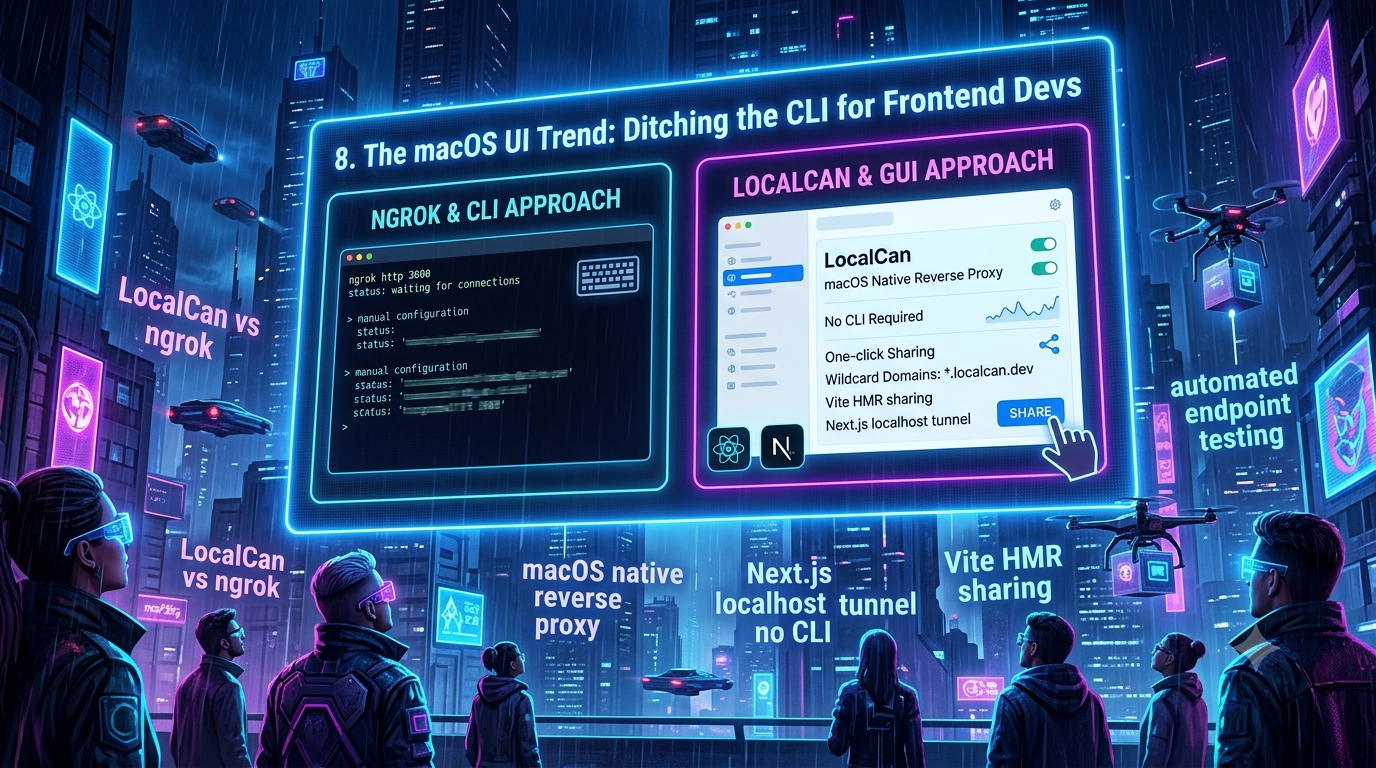
While backend developers have historically lived in the terminal, frontend React and Next.js developers increasingly prefer graphical interfaces for the parts of their workflow that touch networking. Native GUI tools like LocalCan and LocalXpose are picking up a following among designers and frontend engineers who want wildcard domains and one-click sharing without writing a command.
For years, the CLI was treated as the default home for developer tooling. But the modern frontend landscape — component-driven design, visual states, pixel-perfect rendering — has produced a generation of developers who prioritize visual feedback and low-friction developer experience (DX) over terminal fluency. Nowhere is that shift more visible than in localhost tunneling and reverse proxying, where a wave of GUI-first tools has grown up alongside the CLI-first incumbents like ngrok.
This guide looks at why frontend developers are gravitating toward GUI-based tunneling, what the macOS-native reverse proxy tools actually offer today, and where the WebSocket problems that break Vite’s Hot Module Replacement (HMR) over a tunnel actually come from.
The Frontend Developer’s Dilemma: Networking vs. Designing
Frontend engineering has become a specialized discipline in its own right. Today’s React, Vue, and Next.js developers spend their time on state management, server-side rendering (SSR), hydration, accessibility, and responsive layout. Their tools of choice are browser DevTools, design software, and IDEs — not terminal multiplexers.
Yet the moment they need to share a local dev environment with a client, test a layout on a physical iPhone, or wire up a webhook from Stripe or a headless CMS, they’re pulled out of that visual workflow and into the terminal: SSH tunnels, CLI flags, /etc/hosts edits, and background processes that die when a laptop sleeps. For someone whose day-to-day focus is UI and UX, that’s a genuine context switch, and it’s part of why a market for GUI-wrapped tunneling tools has emerged.
The “LocalCan vs. ngrok” Comparison
To understand the current GUI trend, it helps to look at the incumbent. For over a decade, ngrok has been the default answer to “how do I share my localhost,” and it remains fundamentally CLI- and dashboard-first: you run ngrok http 3000 from a terminal or manage endpoints from ngrok’s web dashboard. As of 2026, ngrok has no first-party native desktop app — the handful of “ngrok GUI” projects on GitHub are unofficial third-party wrappers, not ngrok’s own product.
What’s actually still true about CLI friction
The classic complaints about CLI tunnels hold up in part, but one of them needs an update. Historically, ngrok’s free tier handed out a fresh random subdomain every time you restarted the agent, which broke webhook configs and shared links constantly. That’s no longer accurate: ngrok’s current free plan ties one automatically assigned “dev domain” (something like your-name.ngrok-free.app) to your account, and it stays the same across restarts. What you still don’t get on the free plan is a domain you choose, more than three concurrent endpoints pointed at it, or a custom domain — those remain paid-plan features. So the “my tunnel keeps getting a new address” pain point is mostly solved for ngrok specifically, while the terminal-tab management, the need to keep a process alive, and the lack of a built-in visual traffic view remain real friction for tools that don’t ship a GUI.
LocalCan: what it actually ships today
LocalCan positions itself as a native desktop alternative to ngrok, and its feature set has grown substantially through 2026. According to LocalCan’s own changelog and site, the current (3.x) version includes:
- Cross-platform reach: native apps for macOS (Apple Silicon and Intel) and Windows, plus a CLI-only Linux build — a step beyond the Mac/Windows-only tool it started as.
- A bundled CLI and MCP server: LocalCan now ships
localcanas a terminal command (same binary as the background daemon, with scriptable JSON output) and, as of a recent update, exposes itself as an MCP server so AI coding agents can manage tunnels directly. - Local
.localdomains over mDNS/Bonjour with automatic HTTPS, so a phone on the same Wi-Fi network can hitmy-app.localwithout a certificate warning. - Persistent Public URLs, including two included custom domains on its paid Solo tier and unlimited
*.localcan.devreserved subdomains, versus ngrok’s zero included custom domains on its paid Hobbyist tier. - A global edge network: public URLs now route through the nearest of several edge locations rather than a single region, which LocalCan says improves latency and reliability — a feature that was still on the roadmap as of a February 2026 changelog entry and has since shipped.
- A GUI traffic inspector with request replay, image previews in request/response bodies, Brotli decompression support, and filtering by method, path, and status code.
- TCP tunnels and Cloudflare Quick Tunnel integration, both added as 2026 features, plus Basic Auth on public endpoints.
- Configuration as code: projects live as plain YAML files that can be hand-edited, committed to git, or hot-reloaded, with the desktop UI reading and writing the same files.
On pricing, LocalCan’s own comparison against ngrok’s Hobbyist plan (both $10/month or $96/year) highlights a structural difference rather than a headline-price one: ngrok’s plan is usage-metered (5 GB of data transfer, then $0.10/GB; 100k HTTP requests, then $1 per additional 100k), while LocalCan’s Solo plan is flat-rate with unlimited data and requests. Whether that matters depends on your traffic — a low-volume webhook receiver won’t notice the difference, but an always-on demo endpoint might.
One notable feature LocalCan does not have that’s worth flagging for balance: unlike LocalXpose or Tailscale Funnel, it doesn’t advertise UDP tunneling, so it’s not a fit for exposing game servers or other UDP-based services.
Achieving the “Next.js Localhost Tunnel, No CLI” Workflow
Next.js’s hybrid rendering model — mixing SSG, SSR, and client-side routing — often needs a public HTTPS URL during development. Webhooks for CMS previews (Sanity, Contentful) or auth callbacks (NextAuth/Auth.js) won’t function against localhost alone.
The appeal of a no-CLI tunnel workflow comes down to persistence and reduced setup:
- Persistent domains mean you set up your
.env.localwebhook URL once instead of updating it every time a tunnel restarts and hands you a new address — though as noted above, this is now also true of ngrok’s free tier, not just the GUI tools. - Visual port mapping matters because Next.js falls back to 3001, 3002, and so on when 3000 is taken; a GUI that lists active local ports saves you from guessing.
- Zero-config HTTPS matters because the Next.js dev server doesn’t run on HTTPS by default, which causes problems with
Secure/HttpOnlycookies used in auth flows. GUI tunnels wrap the port in a certificate automatically, without a manualmkcertstep.
The macOS-Native Reverse Proxy Angle
Tools built specifically for macOS can lean on OS-level integration that cross-platform CLI tools generally skip: menubar-resident controls instead of a terminal window, the system keychain for storing tokens, native notifications for tunnel or webhook events, and Bonjour/mDNS for broadcasting .local domains across a local network for cross-device testing. Not every GUI tunneling tool implements all of these — it’s worth checking a given tool’s docs for which OS integrations it actually ships rather than assuming — but it’s the general shape of what “native” buys you over a terminal-only tool.
LocalXpose: GUI, File Server, and Full Protocol Coverage
LocalXpose takes a different platform strategy than LocalCan: rather than being macOS-first, it ships a single executable with both a CLI and a GUI across macOS, Windows, Linux, FreeBSD, and Docker. Per LocalXpose’s own comparison pages, its protocol support spans HTTP, HTTPS, TCP, TLS, and UDP — the UDP support is a genuine differentiator, since ngrok doesn’t support UDP tunneling, which rules out use cases like Minecraft servers, VoIP testing, or CoAP/DTLS-based IoT devices for ngrok users.
Its built-in file server is a real feature, not just a marketing line: point it at a folder of static HTML/CSS and it serves the directory over a public URL, no Node, Python, or Docker required — useful for a designer sharing a static prototype who doesn’t want to set up a local web server at all.
On pricing, LocalXpose advertises a free tier (2 HTTP tunnels with traffic inspection) and a Pro plan around $8/month ($96/year) with no bandwidth caps and 24⁄7 always-on tunnels — cheaper on paper than ngrok’s or LocalCan’s $10/month tiers, though feature sets aren’t identical across the three, so a direct dollar comparison should account for what each plan actually includes.
Conquering “Vite HMR Sharing” Over Tunnels
The most technical reason frontend developers run into tunneling trouble is Vite’s Hot Module Replacement. Vite keeps a persistent WebSocket connection open between the browser and the dev server so that saving a file updates the module in place instead of triggering a full reload.
A plain tunnel often proxies the initial HTTP page load fine but mishandles the WebSocket upgrade — either failing to forward the Upgrade: websocket header correctly, or (more subtly) rewriting the Host header in a way that trips Vite’s HMR origin check. The visible symptom is a browser console full of failed WebSocket connections and a dev server that no longer live-updates.
This is a long-documented issue in Vite’s own GitHub discussions, and the standard fix doesn’t actually require switching tools — it requires telling Vite where the public address of the tunnel is, since by default it assumes localhost:
// vite.config.js
export default {
  server: {
    hmr: {
      protocol: 'wss',
      host: 'your-tunnel-hostname.example.com',
      clientPort: 443,
    },
  },
}
Setting hmr.host to the tunnel’s public hostname and hmr.clientPort to 443 tells the browser to open the WebSocket back to the tunnel’s HTTPS endpoint rather than to localhost:5173. Vite also has a documented fallback: if the HMR client can’t establish a WebSocket connection through a reverse proxy, it will attempt to connect directly to the Vite server instead, which is why symptoms sometimes look inconsistent between environments — the fallback works on some networks and not others.
Where GUI tunneling tools genuinely help is in not requiring you to know any of this. Because they’re purpose-built to proxy modern dev servers, they generally auto-detect the WebSocket upgrade and handle the host-header rewriting for you, so a Vite (or webpack, or Rspack, since it reuses the same HMR protocol) dev server keeps live-reloading through the tunnel without touching vite.config.js at all.
The CLI’s Second Life: Built for Agents, Not Just Humans
Here’s a wrinkle in the “GUI is winning” narrative worth calling out: the same tools driving the GUI trend are simultaneously re-adding CLIs — just not for humans. LocalCan’s 3.x releases bundled a scriptable CLI (localcan http 3000, JSON output, every flag documented) and turned LocalCan itself into an MCP (Model Context Protocol) server, so tools like Claude Code or Cursor can open and manage tunnels as part of an agentic coding session. ngrok has moved the same direction from the other end, offering an Agent SDK for Python, Go, Node, and Rust so tunnels can be created programmatically inside an application rather than shelled out to a CLI at all.
The pattern makes sense once you separate the two audiences a tunneling tool actually serves. A frontend developer sharing a build with a client wants a menubar toggle. An AI coding agent running unattended has no menubar to click — it needs a deterministic, scriptable interface, which is exactly what a CLI or an MCP tool call provides. The CLI isn’t disappearing so much as changing who it’s aimed at.
The Future of Developer Ergonomics
The idea that “real developers only use the CLI” has been fading for a while, and the tunneling space is a clear example: local developer environments are visibly moving toward visual, intuitive interfaces, while CI/CD and server provisioning stay firmly in code and CLI territory.
Whether you’re weighing LocalCan against ngrok, looking for a Next.js tunnel workflow that skips the terminal, or just trying to get Vite’s HMR working reliably through a tunnel, the practical answer in 2026 isn’t “GUI beats CLI” so much as “match the tool to who — or what — is actually going to use it.” For a human sharing a prototype, that’s increasingly a GUI. For an AI agent wiring up its own preview environment, it’s still a command.
Changelog
Fact-checked and extended from the original draft. Changes made:
- Corrected ngrok’s URL-persistence claim. The original draft stated ngrok’s CLI workflow involves “copying the randomly generated (and often confusing) alphanumeric URL” and dealing with “URL mismatches when the process restarts.” Per ngrok’s current documentation, the free plan now ties one auto-assigned dev domain to your account that persists across restarts — this pain point is largely resolved for ngrok specifically since ngrok introduced free static domains. Rewrote the “Friction of Legacy CLI Tunnels” section to reflect this while preserving the parts of the complaint that remain accurate (terminal management, no built-in visual inspector).
- Removed the unverified “Go daemon behind a multi-region edge network” claim about LocalCan’s original architecture — could not confirm “Go daemon” from any primary source. Replaced with verified, sourced specifics from LocalCan’s own changelog and site: its global edge network (now shipped, was roadmap-only as of a February 2026 changelog entry), QUIC-based tunnel infrastructure, bundled CLI, MCP server support, TCP tunnels, Cloudflare Quick Tunnel integration, and YAML-based configuration-as-code.
- Corrected LocalCan’s platform support. Original draft said “desktop application for macOS and Windows.” LocalCan now also ships a CLI-only Linux build (v1.1.0 at time of writing), confirmed via its official download page.
- Added real, sourced pricing detail for both LocalCan (flat-rate vs. ngrok’s metered Hobbyist plan, both $10/mo or $96/yr headline price) and LocalXpose (~$8/mo, $96/yr, free tier with 2 HTTP tunnels), replacing vague/absent pricing claims in the original.
- Corrected and expanded LocalXpose’s protocol and platform coverage. Original draft said it handles “HTTP, TCP, and TLS tunnels” on “macOS, Windows, and Linux.” Per LocalXpose’s own comparison pages, it also supports HTTPS and UDP (a real differentiator, since ngrok doesn’t support UDP), and its GUI/CLI ships on macOS, Windows, Linux, FreeBSD, and Docker.
- Softened the macOS-native-integration claims (Keychain storage, native notifications) from stated fact about a specific product to general framing about what “native” tooling in this category typically offers, since these specific implementation details couldn’t be confirmed for either named tool from a primary source.
- Added a technical fix for Vite HMR over tunnels (the
hmr.host/hmr.clientPortconfig) sourced from Vite’s own GitHub discussions and documentation, plus the detail — from Vite’s own docs — that Vite has a built-in fallback to a direct WebSocket connection when the proxied connection fails, which explains inconsistent symptoms across networks. The original draft asserted the WebSocket-breakage problem but didn’t explain the actual mechanism or fix. - Added a new section (“The CLI’s Second Life”) not in the original draft, covering LocalCan’s MCP server and ngrok’s Agent SDKs — a genuinely new 2026 development that complicates the “CLI is dying” framing the original article leaned on, and ties the piece to where the tooling is actually headed for AI coding agents.
- Removed all metadata: the original file’s trailing block of ~40 comma-separated SEO keywords/hashtags was stripped, along with any other non-content metadata.
- Trimmed unsupported hype language throughout (e.g., “massive shift,” “renaissance,” “ultimate frontend developer experience”) in favor of sourced, specific claims.
Related InstaTunnel pages
Continue from this article into the most relevant product guides and workflows.


Comments
Post a Comment