Certificate Transparency Leaks: Why Your "Secret" Tunnel URL Isn't Secret
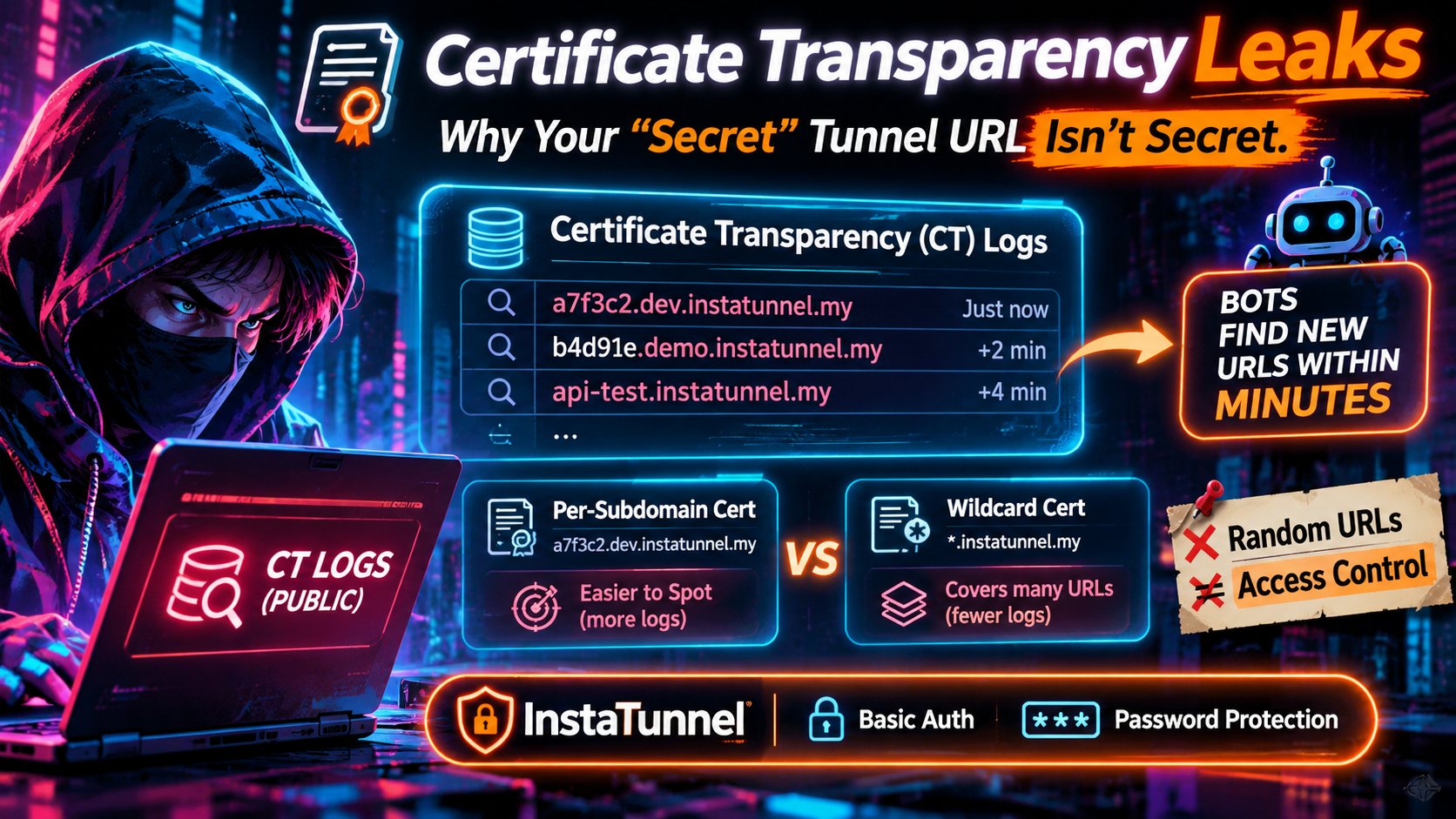
You run one command, your localhost gets a public HTTPS address like https://k7x2m9qa.example-tunnel.dev, and you paste it into a client chat. The label looks random, nobody has it, so it feels private.
It may already be public. If a publicly trusted certificate was issued for that exact hostname, the name is sitting in a public, append-only log that anyone can read, and automated scanners watch those logs around the clock. Obscurity was never access control, and Certificate Transparency (CT) is the clearest proof.
This guide explains how CT leaks hostnames, how quickly scanners act on them, when wildcard certificates help (and when they don't), and what actually protects a development tunnel. Facts were checked against current sources as of November 2026.
What Certificate Transparency Is (and Why It Exists)
Certificate Transparency is a system of public, append-only logs that record TLS certificates issued by publicly trusted certificate authorities (CAs). It was designed as a defensive tool: if a CA mis-issues a certificate for a domain you own, the log lets you detect it. The original specification is RFC 6962, with a revised version in RFC 9162.
The crucial detail for tunnel users is what gets logged: the certificate's full set of subject names. Every hostname on the certificate becomes a public record.
CT is also not optional in practice. Chrome has enforced it for extended-validation certificates since 2015 and for most public certificates since 2018, and Apple platforms enforce their own CT policy. A publicly trusted certificate without valid Signed Certificate Timestamps (SCTs), which are the logs' signed proofs of inclusion, is rejected by browsers. The ecosystem keeps tightening: Chrome Root Program Policy version 1.8, dated June 15, 2026, strengthened CT and PKI governance requirements across all publicly trusted certificate types, and Chrome 148 (released May 5, 2026) dropped support for SCTs delivered through stapled OCSP responses. SCTs must now be embedded in the certificate or delivered through the TLS extension.
The practical consequence: you cannot opt a publicly trusted certificate out of logging. The log entry also exists before you ever serve the certificate, because CAs typically submit a "precertificate" to the logs first to obtain the SCTs they embed in the final certificate.
How Fast Do Scanners Find a New Hostname?
Faster than most people expect. The foundational research is the 2018 ACM Internet Measurement Conference paper "The Rise of Certificate Transparency and Its Implications on the Internet Ecosystem" by Scheitle and colleagues. The authors built a CT honeypot and showed that data from CT logs is used to pick targets for scanning campaigns only minutes after certificate issuance. They also built a method that combined subdomain labels extracted from logged certificates with DNS lookups, and it surfaced 18.8 million previously unknown fully qualified domain names, about 17.7 million more than other public lists contained.
That was 2018. Today the tooling is easier, not harder:
- Real-time streams. Services such as Certstream expose a WebSocket feed of certificates as they are logged, which lets anyone filter for keywords, brands, or patterns in new hostnames.
- Searchable archives. crt.sh lets anyone query every certificate ever logged for a domain, including an Atom feed for new entries. Subdomain enumeration through CT is a standard first step in penetration tests because it is free and thorough.
- Faster logs. Newer "static CT API" logs, such as Let's Encrypt's Sunlight-based Sycamore and Willow logs, publish data as static files that are cheap to mirror. Chrome's log policy requires static-ct-api logs to specify a maximum merge delay of no more than one minute, compared with the roughly 24-hour merge delay typical of RFC 6962 logs. Let's Encrypt's older Oak log was set to be shut down in February 2026.
Whether a particular bot probes your tunnel within thirty seconds or thirty minutes varies, and nobody can promise a number. The safe assumption is the one the research supports: once a certificate containing your hostname exists, treat the name as public.
The Late-September Quick Tunnels Warning
This is not an abstract risk for tunnel users. In late September 2026, TechSpot covered the "one command puts your localhost on the internet" trend around Cloudflare Quick Tunnels and noted that these URLs are public and that bots tend to find them quickly.
Some background on that product:
- Cloudflare introduced Quick Tunnels in September 2021, and the feature was built by an intern, Rishabh Bector.
- A single
cloudflaredcommand returns a temporarytrycloudflare.comaddress with no account, domain, or port forwarding needed. - Cloudflare's own documentation lists limits: no uptime guarantee, up to 200 in-flight requests per tunnel (extra requests return a 429), and no Server-Sent Events support.
Security researchers have noted a second discovery path beyond CT. A report from IT-Connect found that a site:trycloudflare.com search in Google returns pages served from Quick Tunnels. Detection engineers are paying attention too: Elastic ships a rule for adversaries abusing quick tunnels to proxy command-and-control traffic. If defenders and attackers both watch a hostname pattern, your "temporary" URL is not obscure.
Cloudflare's own answer is telling. On October 2, 2026, it added a --allowed-mail flag to Quick Tunnels: visitors must enter a one-time PIN sent to an allowed email address, and you can allow one address, several, or an entire email domain. Access ends when the cloudflared process stops. Before this, per the changelog coverage, anyone holding a Quick Tunnel link could open the service. A vendor adding a gate is a vendor acknowledging that the URL alone is not a gate.
Per-Subdomain Certificates vs. Wildcard Certificates
What CT reveals depends on how your tunnel provider (or you) obtains certificates. This is the heart of the discovery question.
| Per-subdomain certificate | Wildcard certificate | |
|---|---|---|
| What appears in CT logs | The exact hostname, e.g. staging-api.example.com |
Only the pattern, e.g. *.example.com |
| Discovery by log scanners | Immediate and specific | Reveals that subdomains exist, not which |
| Let's Encrypt validation | HTTP-01, DNS-01, or TLS-ALPN-01 | DNS-01 only |
| Coverage | One name (or up to 100 names on a SAN certificate) | One level of subdomains |
| Key-compromise blast radius | Single hostname | Every covered subdomain sharing the key |
| Typical use | Production services with stable names | Dev, staging, per-customer or per-session subdomains |
A wildcard entry shows up in the log as *.example.com, one record regardless of how many subdomains you serve. So internal-dev.example.com or a per-session tunnel label does not appear individually. This is why practitioners, including Let's Encrypt community members, point to wildcards as the standard way to avoid advertising subdomain lists. Subdomain enumeration tools lean heavily on CT, and a wildcard blunts that technique.
Wildcards come with trade-offs worth stating honestly. They require DNS-01 validation with Let's Encrypt, which means automated access to your DNS provider's API. A single private key now protects many hostnames, so a compromise has a wider blast radius. And a wildcard covers only one label level: *.example.com does not cover a.b.example.com.
For tunnel services the picture has two sides:
- If the provider terminates TLS with a wildcard on its own domain, individual tunnel names are not published through CT by that certificate. The exposure moves elsewhere (see below).
- If you bring your own domain and the setup issues one certificate per tunnel hostname, each hostname is published the moment the certificate is logged.
Ask your provider which model it uses. Do not assume.
Wildcards Hide the Name From CT, Not From Everyone
A wildcard solves one leak path. A subdomain is still a plain DNS name, and names travel:
- DNS and network visibility. Resolvers, passive DNS databases, and corporate proxies see lookups. Server Name Indication (SNI) is sent in cleartext during the TLS handshake unless Encrypted Client Hello is in use.
- You share it. The URL goes into Slack, tickets, pull request comments, and email. Link previews and message archives can fetch and store it.
- Browsers and referrers. Browser history, sync, extensions, and
Refererheaders on outbound links can carry the URL to third parties. - Search engines and crawlers. As the Quick Tunnels indexing report shows, a public URL can end up in search results if it is linked anywhere a crawler visits.
- Logs. Anything your app, your CDN, or your analytics stack logs includes the host.
A wildcard certificate reduces one passive, automated discovery channel. It does not make the hostname a credential.
Why a Random URL Is Not Access Control
Access control means the system checks who you are and refuses everyone else. A random hostname does none of that. Anyone who learns the address gets in, with no log of who they are.
The math sometimes gets misused as a defense. A random eight-character base-36 label has roughly 2.8 trillion possibilities, which sounds enormous. But the strength of a secret depends on whether it has leaked, not only on how many guesses it would take. Once the name is in a CT log, a Certstream feed, a Slack export, or a browser's sync history, its entropy is irrelevant. Attackers do not need to guess a name they can read.
Three further problems follow:
- No revocation. You cannot "rotate" a leaked URL without taking the tunnel down.
- No identity. You cannot tell your client from a bot.
- No scope. Whoever finds the URL reaches the entire service behind it: admin routes, debug endpoints, webhook handlers, local databases exposed through the app.
Treat a tunnel URL the way you would treat a public IP address with an open port, because functionally that is what it is.
What Actually Protects a Dev Tunnel
Assume discovery. Then make discovery harmless. A layered approach works:
- Authenticate at the edge. Put a credential check in front of the tunnel so a discovered URL returns a login challenge rather than your app. With InstaTunnel, the CLI flag reference includes
--passwordfor password protection and--auth user:passfor HTTP Basic Auth, and--subdomainfor a custom, stable name.
   # Password-protect a tunnel
   instatunnel 3000 --password "a-long-random-passphrase"

   # HTTP Basic Auth
   instatunnel 3000 --auth demo:a-long-random-passphrase

   # Stable name plus protection
   instatunnel 3000 --subdomain client-demo --password "a-long-random-passphrase"
Flags and tiers change, so check instatunnel --help and the current docs before relying on one.
- Use long, random credentials. Basic Auth has no built-in brute-force defense, and scanners that find an endpoint will try common passwords. Generate a passphrase from a password manager; never reuse one.
- Keep HTTPS on. Basic Auth sends credentials in a reversible encoding, not encrypted ones, so it is only acceptable over TLS.
- Know where edge passwords don't fit. Automated callers such as webhook senders usually cannot answer a browser password prompt. For those, verify provider signatures (HMAC or signed headers) on your own server, and keep the tunnel narrowly scoped to the routes the provider needs. Test any gate with the real client before a demo.
- Shrink the lifetime. A tunnel that runs for the length of a demo is exposed for less time than one left up all week. Use
instatunnel --listto see what is running and--kill <subdomain>to stop one. - Do not expose what you would not publish. Bind the local service only to what you intend to share, strip debug routes, and use test data. Never tunnel a database or admin console without a second authentication layer in the application itself.
- Monitor your own names. If you operate your own domain, subscribe to CT monitoring (crt.sh feeds or Certstream filters) for it. You will see exactly what an attacker sees and can notice unexpected certificates early.
- Prefer identity-aware gating for teams. For shared staging links, edge authentication that ties access to a verified identity, such as one-time email PINs like Cloudflare's new flag or OAuth and OIDC at the proxy, beats a shared password because you can scope it per person.
Frequently Asked Questions
Can I stop my tunnel hostname from being logged to CT? Not with a publicly trusted certificate. Logging is a condition of browser trust. The workable approaches are a wildcard certificate (so the specific name is not logged) or a private CA for internal-only names, which will not be trusted by outside browsers.
Does a wildcard certificate make my tunnel private? No. It removes one discovery channel, CT logs, for individual hostnames. Sharing, referrers, DNS visibility, and crawlers still apply, so authentication is still required.
How quickly will scanners find a new hostname? Research from 2018 showed scans arriving within minutes of issuance, and the log infrastructure and tooling have only improved since. Plan for near-immediate discovery.
Is a long random subdomain good enough for a short demo? For something genuinely harmless, a short-lived unlisted link carries small risk. For anything involving customer data, credentials, or internal tools, add authentication. It takes one flag.
Are Basic Auth and password protection enough? They stop casual and automated discovery from reaching your app. They are not a substitute for application-level security, signed webhooks, or identity-aware access for sensitive work.
The Bottom Line
Certificate Transparency makes every publicly trusted hostname readable, and the tools to read it in real time are free. A per-subdomain certificate publishes your tunnel's exact name, and a wildcard hides the name from CT but not from the many other places names leak. Either way, the right mental model is the same: the URL is an address, not a password.
Put authentication in front of anything you tunnel, keep credentials long and random, and keep exposure short. If you do, a scanner finding your hostname costs you a login prompt instead of an incident.
Sources
- Scheitle et al., The Rise of Certificate Transparency and Its Implications on the Internet Ecosystem, ACM IMC 2018
- Encryption Consulting, Certificate Transparency monitoring (Chrome Root Program Policy 1.8, Chrome 148)
- Chrome, Certificate Transparency Log Policy
- Let's Encrypt, Certificate Transparency (CT) Logs
- Apple, Certificate Transparency policy
- TechSpot, One command trick can put localhost on the internet
- Cloudflare, Quick Tunnels documentation and Quick Tunnels: Anytime, Anywhere
- Cloudflare changelog, Protect Quick Tunnels with email authentication (via Tproger)
- IT-Connect, TryCloudflare Quick Tunnels are being indexed on Google
- Elastic, Potential Protocol Tunneling via Cloudflared
- InstaTunnel, npm package README
Originally published at https://instatunnel.my/blog/certificate-transparency-leaks-why-your-secret-tunnel-url-isnt-secret


Comments
Post a Comment